How EchoMe Reads Your Voice
Your Knowledge Base is what makes EchoMe different from every other AI writing tool. It learns your tone, vocabulary, sentence structure, and communication style from your existing content. The more you feed it, the more the output sounds like you wrote it yourself.
5 min read
For a full video walkthrough of this feature, watch the platform overview guide.
What is Your Voice?
Your Voice (open it from Teach Echo more on the Create page) is where EchoMe stores and analyzes your content. It maps your unique voice across five dimensions: signature phrases, avoid phrases, writing style, AI-phrase cleanliness, and semantic similarity to your past content. Think of it as teaching an AI how you think and communicate.
Use the unified input to add content
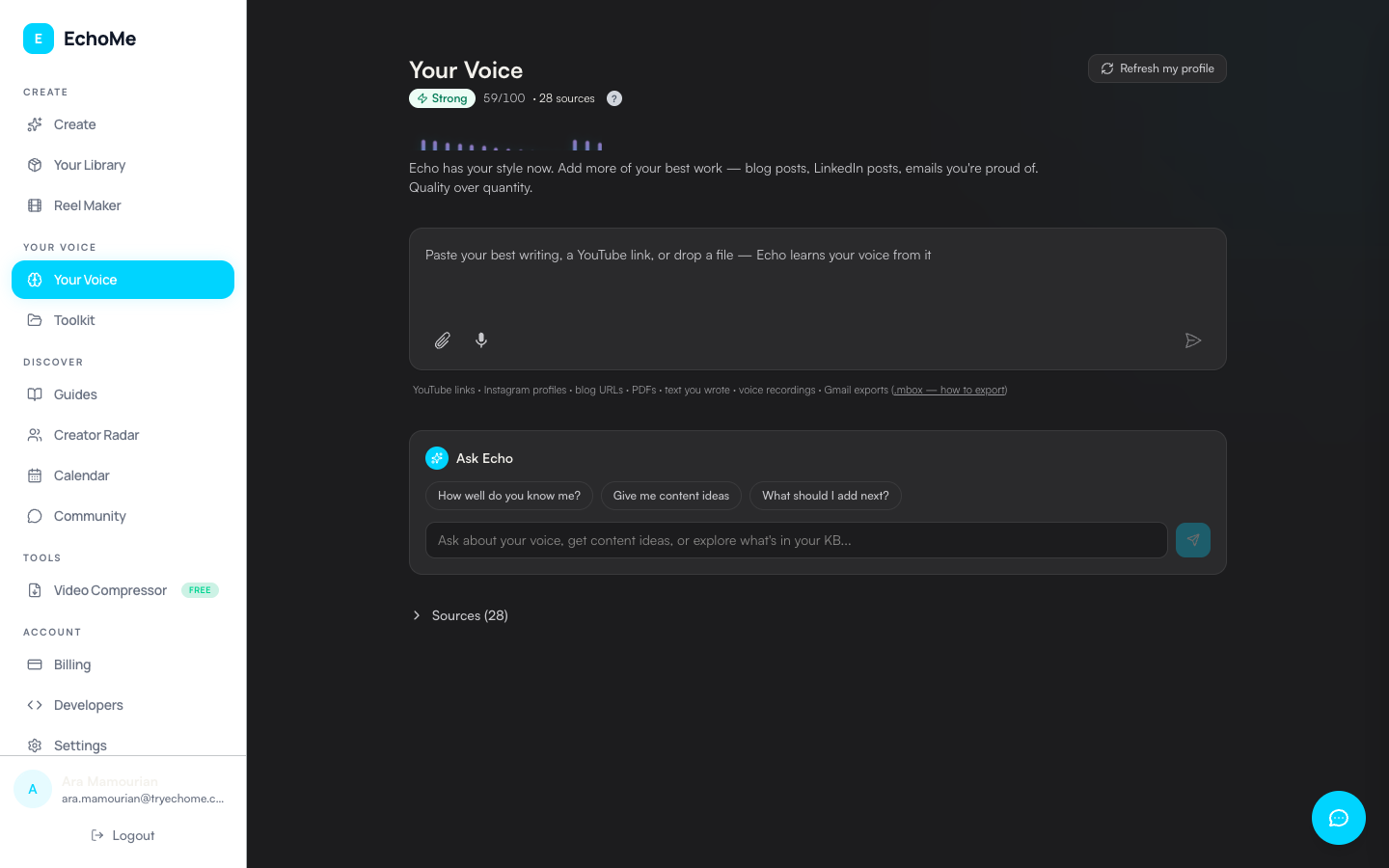
The Your Voice page has a single chat-style input where you can add any type of content source. Paste a YouTube channel URL, Instagram profile link, blog URL, or drop files directly. You can also type or paste text, or record a voice note using the mic button. EchoMe auto-detects the content type and processes it accordingly.
Import your writing
Upload PDFs, Word docs, or text files through the unified input. Import blog posts by pasting your blog URL. EchoMe auto-discovers RSS feeds, with a sitemap fallback for static blogs (Hugo, Astro) that don't expose an RSS feed. Import sent emails via Google Takeout. Or paste any text directly.
Record a voice note
Click the mic button inside the chat-style input (next to the paperclip attach button) and speak naturally about any topic for 2+ minutes. EchoMe transcribes and analyzes your speaking patterns. This captures cadence, rhythm, and word choice that written content sometimes misses.
How voice matching works
EchoMe scores your content across five dimensions:
- Signature phrases: the words and phrases you reach for naturally
- Avoid phrases: words and phrases you've explicitly told Echo to skip
- Writing style: sentence length, rhythm, formality, contractions
- AI-phrase cleanliness: how clear the output is of generic AI giveaways
- Semantic similarity: how close the output is to your past content in meaning
Your voice strength score (0–100) shows how well Echo can replicate your voice. Each source you add strengthens the profile.
Train it as you use it (thumbs up/down)
Every generated piece (LinkedIn post, blog draft, carousel slide) has a thumbs widget. Thumbs up the outputs that sound like you, thumbs down the ones that don’t. The system trains on both: for 30 days, the patterns you flagged as off get excluded from future generations. The voice gets closer to yours every week you use it.
Tips for best results
- Add at least 3 different content sources. Variety helps.
- Emails are gold because they show how you really communicate.
- Include both long-form (blog posts, articles) and short-form (social posts, emails).
- Voice recordings capture patterns that text alone misses.
- Update regularly as your voice evolves.
Checking your voice strength
Open Your Voice in the sidebar. The page shows your voice strength as a 0–100 score with a visual waveform across the five dimensions above. Use the chat input at the top to ask Echo about your voice. Questions like "how close is the match?", "describe my style", or "what am I missing?" work well to identify gaps in your training data.